

系统环境
系统:Ubuntu 22.04
显卡:RTX5880 48G
内存:64G
PyTorch:2.4.0+
模型说明
阿里巴巴旗下Wan团队开源的。
包括以下核心模型:
其中:
MoE:Mixture of Experts,混合专家架构
VAE:Variational Autoencoder,变分自编码器
T2V/I2V/TI2V/S2V:分别为 Text-to-Video、Image-to-Video、Text&Image-to-Video、Speech-to-Video 的缩写
安装Wan2.2
首先安装显卡驱动和CUDA等NV全家桶,可以参考:Ubuntu显卡驱动以及CUDA、cuDNN、TensorRT的安装 - FunnyWii's Zone
CUDA:12.1
cuDNN:8.9.2
官方Repo没有告知最小CUDA和cuDNN版本。只能根据torch≥2.4.0确认CUDA要大于11.7。搜了很多关于CUDA依赖的文章,都是AIGC,没啥参考价值。
安装conda
# 安装最新版x86 conda
curl -O https://repo.anaconda.com/miniconda/Miniconda3-latest-Linux-x86_64.sh
sudo chmod +x Miniconda3-latest-Linux-x86_64.sh
./Miniconda3-latest-Linux-x86_64.sh
创建虚拟环境
conda create -n wan2.2 python=3.10
conda activate wan2.2
克隆Wan的Repo,并安装依赖
git clone https://github.com/Wan-Video/Wan2.2.git
cd wan2.2
pip install -r requirements.txt
在安装flash_attn阶段,大概率会遇到问题。
Collecting flash_attn (from -r requirements.txt (line 15))
  Downloading https://pypi.tuna.tsinghua.edu.cn/packages/3b/b2/8d76c41ad7974ee264754709c22963447f7f8134613fd9ce80984ed0dab7/flash_attn-2.8.3.tar.gz (8.4 MB)
     ━━━━━━━━━━━━━━━━━━━━━━━━━━━━━━━━━━━━━━━━ 8.4/8.4 MB 1.1 MB/s  0:00:07
  Installing build dependencies ... done
  Getting requirements to build wheel ... error
  error: subprocess-exited-with-error

  × Getting requirements to build wheel did not run successfully.
  │ exit code: 1
  ╰─> [19 lines of output]
      /tmp/pip-build-env-8wf9n6w6/overlay/lib/python3.10/site-packages/setuptools/_vendor/wheel/bdist_wheel.py:4: FutureWarning: The 'wheel' package is no longer the canonical location of the 'bdist_wheel' command, and will be removed in a future release. Please update to setuptools v70.1 or later which contains an integrated version of this command.
        warn(
      Traceback (most recent call last):
        File "/home/weifangyuan/miniconda3/envs/wan2.2/lib/python3.10/site-packages/pip/_vendor/pyproject_hooks/_in_process/_in_process.py", line 389, in <module>
          main()
        File "/home/weifangyuan/miniconda3/envs/wan2.2/lib/python3.10/site-packages/pip/_vendor/pyproject_hooks/_in_process/_in_process.py", line 373, in main
          json_out["return_val"] = hook(**hook_input["kwargs"])
        File "/home/weifangyuan/miniconda3/envs/wan2.2/lib/python3.10/site-packages/pip/_vendor/pyproject_hooks/_in_process/_in_process.py", line 143, in get_requires_for_build_wheel
          return hook(config_settings)
        File "/tmp/pip-build-env-8wf9n6w6/overlay/lib/python3.10/site-packages/setuptools/build_meta.py", line 333, in get_requires_for_build_wheel
          return self._get_build_requires(config_settings, requirements=[])
        File "/tmp/pip-build-env-8wf9n6w6/overlay/lib/python3.10/site-packages/setuptools/build_meta.py", line 301, in _get_build_requires
          self.run_setup()
        File "/tmp/pip-build-env-8wf9n6w6/overlay/lib/python3.10/site-packages/setuptools/build_meta.py", line 520, in run_setup
          super().run_setup(setup_script=setup_script)
        File "/tmp/pip-build-env-8wf9n6w6/overlay/lib/python3.10/site-packages/setuptools/build_meta.py", line 317, in run_setup
          exec(code, locals())
        File "<string>", line 22, in <module>
      ModuleNotFoundError: No module named 'torch'
      [end of output]

  note: This error originates from a subprocess, and is likely not a problem with pip.
ERROR: Failed to build 'flash_attn' when getting requirements to build wheel去flash_attn的Releases · Dao-AILab/flash-attention页面下载whl文件即可,注意cuda,torch和py版本要匹配。
下载完成后安装,要是还不行,我也不知道了。
pip install flash_attn-2.8.3+cu12torch2.5cxx11abiFALSE-cp310-cp310-linux_x86_64.whl到这里,你已经可以通过源码来使用模型了,参考Wan的官方命令就行。
而且如果你使用无GUI的服务器,也可以到此为止了,下面ConfyUI的内容,是为了用户图形界面。
python generate.py --task i2v-A14B --size 1280*720 --ckpt_dir ./Wan2.2-I2V-A14B --offload_model True --convert_model_dtype --image examples/i2v_input.JPG --prompt "Summer beach vacation style, a white cat wearing sunglasses sits on a surfboard. The fluffy-furred feline gazes directly at the camera with a relaxed expression. Blurred beach scenery forms the background featuring crystal-clear waters, distant green hills, and a blue sky dotted with white clouds. The cat assumes a naturally relaxed posture, as if savoring the sea breeze and warm sunlight. A close-up shot highlights the feline's intricate details and the refreshing atmosphere of the seaside."记得激活你的conda环境。
安装ComfyUI
Linux只能源码安装ComfyUI,记得激活conda环境。
ComfyUI的conda环境和Wan的基本不冲突,可以在一个环境里安装python的库。
本质原因是,ComfyUI不依赖于任何其他源码仓库,它只需要模型。
git clone https://github.com/Comfy-Org/ComfyUI
cd ComfyUI
pip install -r requirements.txt
进入ComfyUI的路径,打开终端,运行
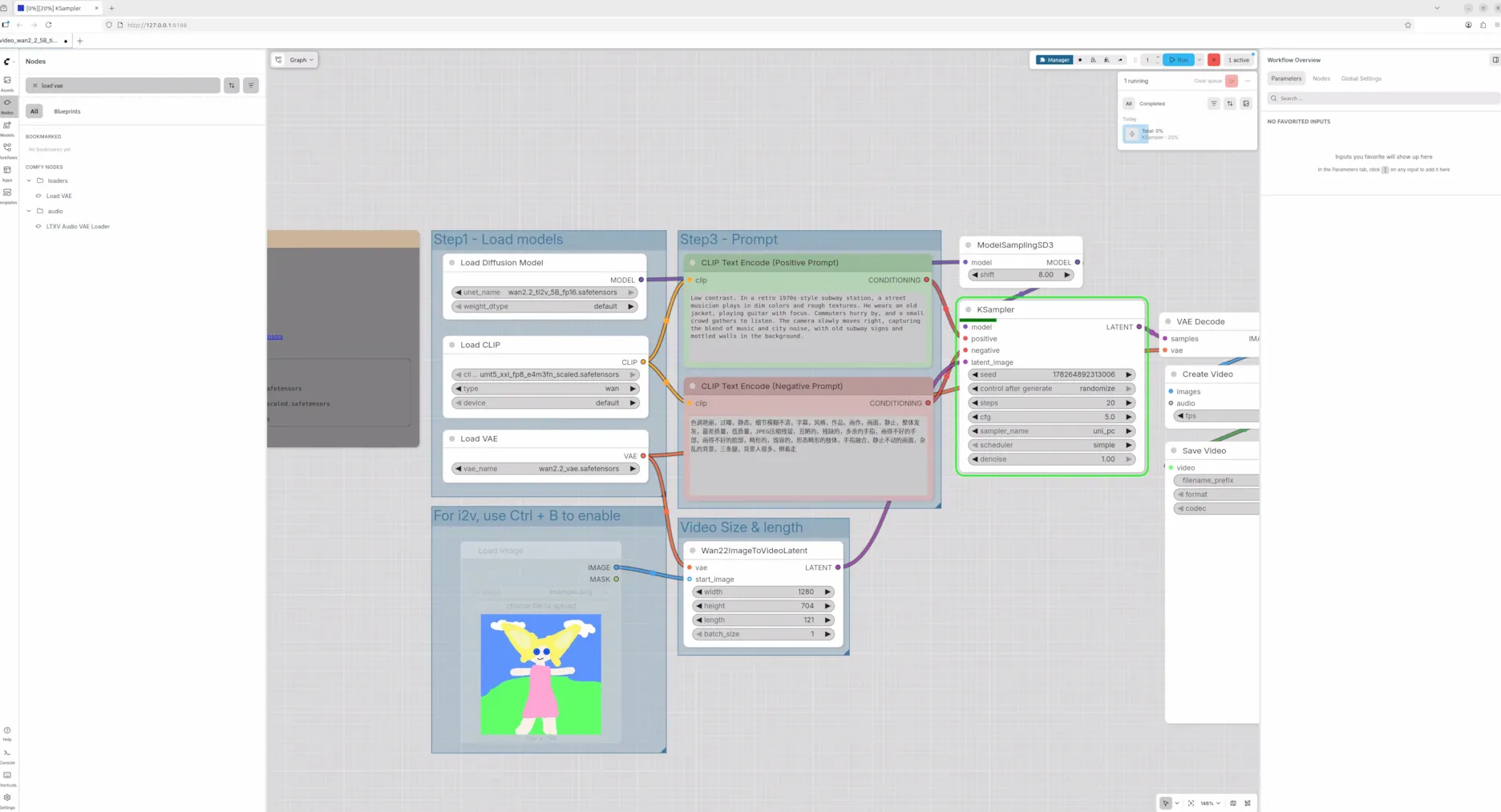
python main.py 点击终端打印的地址,比如http://127.0.0.1:8188,就可以看到界面了。下图是ComfyUI官方提供的一个工作流。
再说点网上没人说过的。
Wan官方提供的两种模型下载途径,扩散模型都分片了,分片模型的术语叫shard,如果想自己搜索别去搜什么split和multi-part。
分片的模型在Wan仓库中使用源码运行,是没问题的。
但是在ComfyUI官方提供的工作流的节点,并不支持分片模型加载(其实是我没找到方法)。Reddit中有人提到只要把分片模型和config文件放在同一个文件夹去加载就行了,我没成功。
如果想使用官方节点加载模型,需要前往 Wan2.2 Video Generation ComfyUI Official Native Workflow Example - ComfyUI 下载3个格式为safetensors的单一模型文件。然后将3个模型分别放到ComfyUI/models对应的路径下
其中
diffusion:扩散模型,用于文/图生视频,5B代表参数50亿。
VAE:变分自编码器,用于视频编解码,图像和视频转换为模型可处理的表示,再将模型生成的表示转换为视频。
UMT5(CLIP):文本编码器,将用户输入的prompt转换为模型可处理的向量表示。
这里safetensors 是Hugging Face提供的文件格式,里面只包含数值,无代码,不用担心恶意代码执行。
评论